
Stats
We may earn commissions from some links.We may earn commissions from links to support our work. Learn more.
Get more AI tool alerts:
About Executor
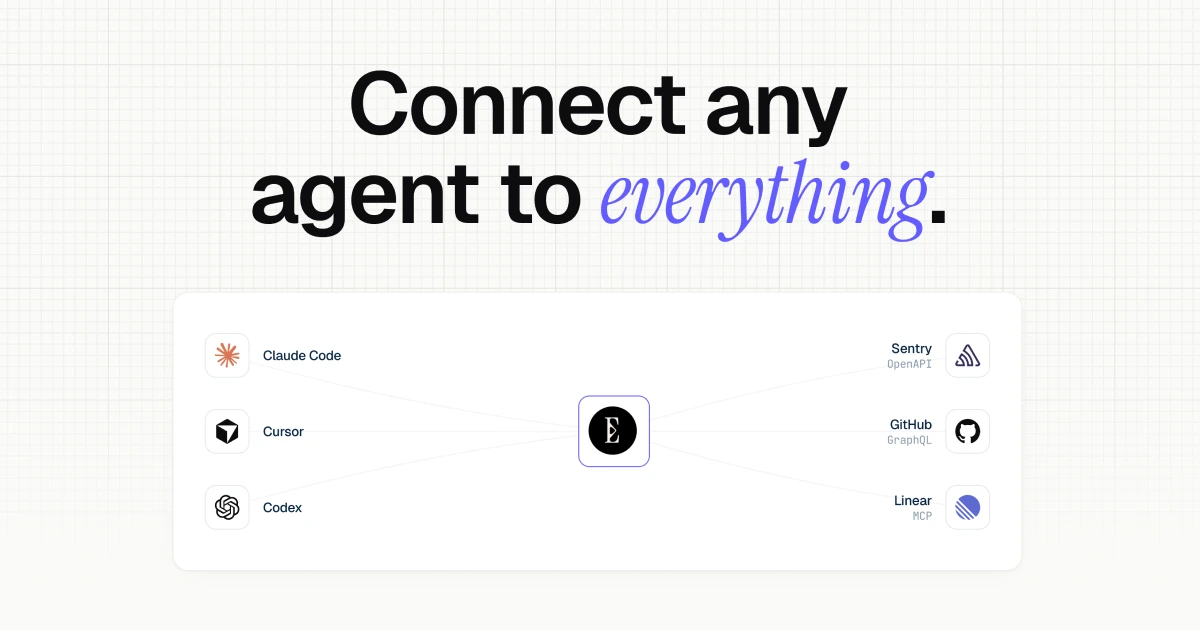
Executor gives your AI agents a shared set of app connections. Instead of setting up GitHub in Claude Code, repeating the setup in Cursor and doing it again in Codex, you connect the service to Executor and let compatible agents use it through one MCP gateway.
I'd shortlist it if you switch between agents or want a team to share connections and permissions. Compared with Composio, its strongest appeal is deployment control: use Cloud, run it locally or self-host the open-source software. Try Executor free with up to three members and 100,000 monthly Cloud executions.
What is Executor?
Executor is an integration layer between an AI agent and the services it needs to use. Your agent interprets the request. Executor provides access to the tools, attaches the appropriate connection credentials and applies the rules for calling them.
MCP, or Model Context Protocol, is how compatible agents communicate with those tools. Executor acts as a gateway: an agent connects to Executor, which connects to the underlying services and presents a shared catalog.
For example, an agent could use a GitHub connection to inspect open issues, then create a task through a connected project-management API. Executor supplies access to those operations; the agent still decides which issues matter and what to put in the task.
It does not replace Claude Code, Cursor or a general-purpose agent such as Hermes Agent. It also does not replace a scheduler or a visual automation builder. Its job is to make tools available to agents without rebuilding the same integration setup for each one.
Who is Executor For?
Executor makes the most sense for people who use several agents. If you move between coding assistants depending on the project, keeping your connections outside any one assistant is useful. Adding or changing an upstream integration can happen in Executor rather than in every client's configuration.
Small teams get another benefit. Admins can provide shared workspace connections and policies, while individuals keep their own connections. A new teammate can use the shared catalog instead of assembling a separate collection of credentials and MCP servers.
Developers with internal APIs are also a good fit. An API described by an OpenAPI specification or a compatible GraphQL endpoint can become part of the catalog without waiting for it to appear in a consumer app directory.
I would be less inclined to add Executor if I used one assistant with two reliable built-in connectors. A gateway is another service to configure and keep available. The value grows when repeated setup, multiple accounts or inconsistent permissions become an actual problem.
Executor Pros and Cons
My main reservation is operational rather than conceptual. Centralizing connections removes duplication, but it also makes the gateway a dependency for every agent using it. That is a reasonable trade when the shared setup saves work; it is unnecessary overhead when direct connections already cover the job.
Executor Features: Shared Connections, Code Mode and Tool Policies
Connect MCP servers and APIs
Executor accepts existing MCP servers, OpenAPI specifications and GraphQL endpoints. Its repository also includes Google Discovery support and a plugin system for developers extending the integration layer.
This is broader than forwarding a collection of MCP servers. OpenAPI describes an API's operations and inputs; Executor can turn those operations into callable tools. GraphQL support uses introspection to expose queries and mutations.
That makes private APIs a useful use case. If your team's service has a suitable specification and working authentication, it can sit beside third-party integrations in the same catalog. Executor does not make an undocumented endpoint or an unavailable API usable by itself.
Keep multiple accounts organized
Executor separates an integration from a connection. The integration describes what tools exist. A connection is a configured instance of it, such as a particular GitHub account or organization.
One integration can have several connections. You could keep personal and work accounts separate, or give an agent access to different customer environments through distinct named connections. Public APIs can also have connections without credentials.
Workspace connections let teams share access centrally, while personal connections remain available for individual use. The benefit is managing those relationships once, rather than relying on each agent's configuration to represent the same accounts correctly.
Discover tools and combine calls with code mode
Executor's code-mode workflow lets an agent search for relevant tools, inspect their input details and invoke them through generated TypeScript or JavaScript in a sandbox.
Instead of putting every connected tool's full definition into the initial prompt, the agent retrieves details as it needs them. This reduces upfront tool-definition context, particularly for large catalogs. It does not eliminate the context used by tool descriptions and results during a task.
Code mode also lets an execution combine several API calls. An agent could fetch a list, filter it in code and make follow-up calls for the matching items rather than returning every intermediate response to the conversation.
I like this approach for work that crosses services or handles large responses. It gives the agent a practical way to process results before presenting them. It is not a guarantee that the agent's code or final answer will be correct.
Decide which actions require approval
Each tool can be allowed, require approval or be blocked. An allowed operation runs without interruption. An approval-required operation pauses until a person approves it. A blocked tool cannot run.
Executor derives starting policies from the integration source, including HTTP methods, MCP hints and GraphQL operations. You can override the policy for individual tools and block tools across a workspace.
For a shared setup, that is more useful than asking everyone to maintain the same instructions in separate agent prompts. The rule sits in the tool-access layer. I would still review the defaults for sensitive connections: an HTTP method or a tool's metadata cannot fully describe the business impact of an action.
Keep authentication out of generated code
Executor attaches connection credentials to upstream requests on the host side. The agent's sandboxed code calls a tool rather than receiving the raw authentication token needed to access the service.
Cloud stores credentials in WorkOS Vault. Local and self-hosted setups have different storage options, and the project supports secret providers such as 1Password. That flexibility is useful if you want to control how credentials are resolved.
This protects the authentication path; it does not make every tool response nonsensitive. An authorized call can still return private account data, and the agent must receive the information needed to complete its task.
Choose Cloud, desktop, CLI or self-hosting
The desktop app and CLI use the same local background service. Local mode is attractive when you want that service on your own machine, but a cloud-hosted agent cannot automatically reach a gateway bound to your computer's loopback address.
Cloud is the simpler starting point for agents running in different places. Self-hosting gives you more operational control, with the responsibility that comes with it. A Docker installation needs its database and encryption keys preserved; the Cloudflare deployment needs Access authentication configured correctly.
Deployment also affects integrations that launch local processes. A local stdio MCP server has different requirements from a remote HTTP server. I would choose the deployment around the tools and clients I need, rather than assume every combination works identically everywhere.
Executor Pricing: Plans and Execution Limits
Executor Cloud uses per-member pricing, with a free plan for small teams.
An execution is one call from your agent to Executor. That execution can make many individual tool calls internally. The 100,000 free executions are therefore not simply a quota of 100,000 upstream API requests.
When the free allowance runs out, calls pause until the month resets or you move to Team. Nothing is deleted. Team removes the monthly Executor execution cap, but it does not remove quotas or charges from the APIs and model providers you use.
For a solo user or a team of up to three people, I would start with Free. Team becomes relevant when you need more members, more executions or its domain-based joining features. Enterprise is for organizations that need the additional deployment, identity and support arrangements.
Self-hosting is available without buying an Enterprise contract. Enterprise adds support and organizational capabilities; the open-source software itself is free to run. You still pay for any infrastructure and external services your setup uses.
Start with Executor's free Cloud plan.
Executor vs Alternatives
Executor vs Composio
Composio is the closest comparison if your goal is giving an AI assistant access to more apps. It offers a managed catalog of more than 1,500 apps, authentication, tool discovery and execution, with options for existing assistants and developers building their own products.
Executor is especially appealing when you want to assemble and control a shared catalog from MCP servers and API specifications. Its local and self-hosted options give you a clear way to run that gateway on your own infrastructure.
Both support discovering tools as needed and combining actions programmatically. I would not choose between them on code mode alone. The more useful question is whether you want broad managed app integrations or more control over where your shared gateway runs and how its connections are configured.
Those allowances measure different things, so I would not treat the matching headline figure as a like-for-like quota. Composio's Pro plan is also metered beyond its included allowances and credit; Executor Team's unlimited executions do not cover external provider bills.
Choose Composio when its managed integrations cover the apps you need and you want that integration infrastructure handled for you. Choose Executor when connection reuse, shared policies and deployment control are the stronger requirements.
Executor vs direct MCP connections
Connecting an MCP server straight to your agent is still a sensible option. If you use one client and a few services, it avoids introducing a gateway between them.
Executor earns its place when the same connections need to serve several clients, when accounts need clearer separation or when a team needs centrally applied policies. It can also bring APIs without their own MCP server into the same setup through supported specifications.
I would keep direct connections for a small, stable toolset. Once maintaining those connections across clients becomes repetitive, Executor is worth evaluating.
Verdict
Executor is a strong fit for people who switch between AI agents and want their integrations to remain consistent. Shared connections, per-tool policies and the choice of hosted or self-managed deployment give it a clear purpose beyond adding another MCP endpoint.
I would start with Cloud Free to evaluate the actual connections and approval behavior my workflow needs. For a small team, the allowance is substantial enough to make that a useful evaluation rather than a limited demonstration. I would self-host when control over the deployment matters enough to justify maintaining it.
Composio remains my preference when broad managed app access is the priority. Direct MCP connections remain the simpler choice for a few services in one agent. Executor is the option I'd consider when the integration setup itself needs to become shared infrastructure.
Explore Executor's Cloud and self-hosted options.
For more practical AI-tool reviews, join the Hypertools newsletter.
FAQ
Is Executor free?
Executor Cloud has a free plan for up to three members, with 100,000 executions per month and unlimited integrations. Its MIT-licensed software is also free to run yourself. Hosting, model usage and paid external APIs can cost extra.
What counts as an Executor execution?
One call from your agent to Executor counts as an execution. The code inside that execution can make several individual tool calls, so an execution is not necessarily a single API request.
What happens at the free-plan limit?
Calls pause until the monthly allowance resets or you upgrade to Team. Your data is not deleted when the free execution allowance runs out.
Which AI agents can use Executor?
Executor works through MCP with compatible clients, including coding assistants such as Claude Code, Cursor and Codex. The client must support the connection and authentication method your deployment uses. Hosted agents also need a reachable endpoint.
Can I self-host Executor?
Yes. Executor documents Docker and Cloudflare deployments, plus a local desktop app and CLI. Self-hosting means managing availability, authentication and persistent state yourself. You do not need an Enterprise support contract merely to run the open-source software.
Is Executor a Composio alternative?
Yes. Both give agents access to connected services. Executor is particularly relevant for a shared MCP/API gateway with local or self-hosted deployment, while Composio emphasizes broad managed app integrations for existing assistants and developer products.


