
Stats
We may earn commissions from some links.We may earn commissions from links to support our work. Learn more.
Get more AI tool alerts:
About Folk
Your sales team is drowning in admin work. Updating CRM fields, researching prospects on LinkedIn, scheduling follow-ups, remembering who to contact next. Most sales reps spend 3-4 hours daily on manual data entry instead of actually selling.
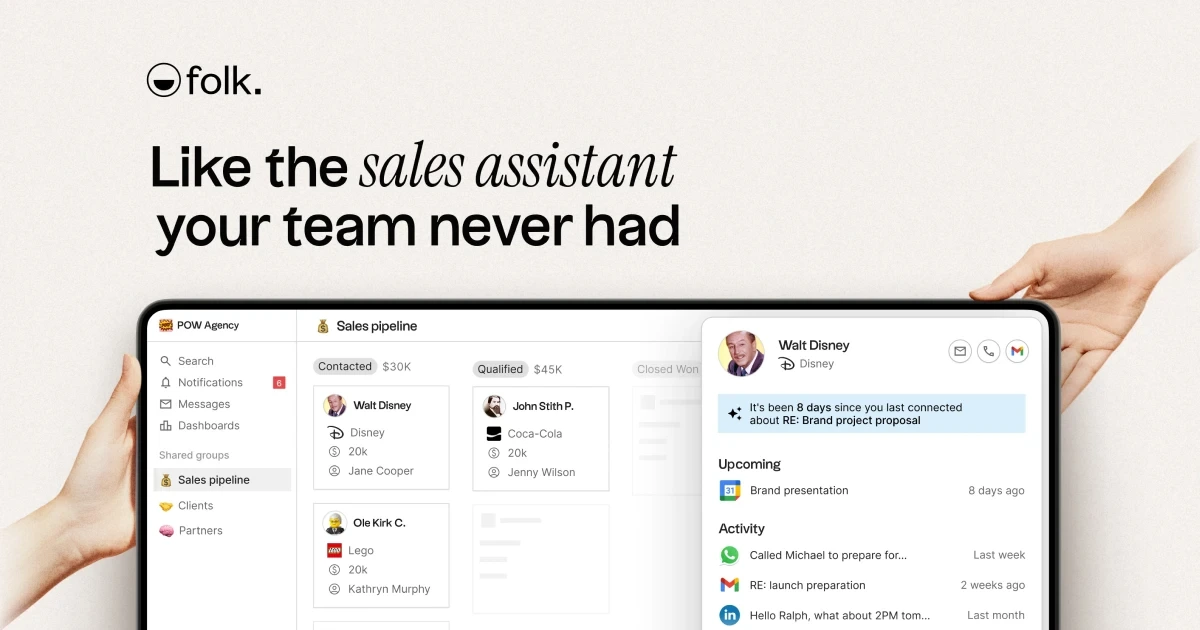
Folk is a CRM that uses AI assistants to handle the busywork automatically. It researches companies for you, tells you when to follow up, captures leads from LinkedIn in one click, and keeps your pipeline updated without manual entry. Think of it as having a sales assistant who never sleeps and doesn't need to be trained.
Built for teams who want simpler relationship management without sacrificing functionality. Folk handles contacts, deals, email campaigns, and integrations with over 6,000 apps. The interface doesn't look like enterprise software from 2012. It's rated 4.9 on Product Hunt and 4.5 on G2, which is rare for CRM tools (most hover around 3.5).
Start automating your sales workflow with Folk's free trial here.
What is Folk?
At its core, it's a CRM that combines contact management with AI-powered assistants that do the repetitive work. You're not just storing contact information - the system actively researches prospects, identifies follow-up opportunities, and enriches lead data automatically.
The platform centers around three AI assistants. The Research Assistant automatically generates customized research notes about companies. The Follow-up Assistant scans your conversations and tells you exactly when to reach out again. The Workflow Assistant (coming soon) will handle qualifying leads, sending emails, and updating your CRM without human intervention.
Everything syncs with your existing tools - email, calendar, WhatsApp, LinkedIn. The folkX Chrome extension lets you import leads directly from LinkedIn without copy-pasting. Smart fields find email addresses and phone numbers in one click. The system enriches contact details automatically so you're not hunting down basic information manually.
Folk's designed for teams between 5-50 people who need CRM functionality but don't want the complexity of Salesforce or the limitations of a spreadsheet. It's particularly popular with agencies, consultancies, and B2B sales teams who prioritize relationships over volume.
Who is Folk For?
This works best for specific scenarios, not just generic "sales professionals."
Sales teams closing 10-30 deals monthly who waste hours on data entry and prospect research. If you're spending more time updating Salesforce than talking to customers, Folk handles the admin automatically.
Agencies managing 50-200 client relationships across multiple team members. The shared workspace keeps everyone updated on contact history, interactions, and next steps without constant Slack messages asking "did anyone follow up with X?"
Consultants and freelancers juggling 20+ ongoing conversations who need follow-up reminders but don't want enterprise CRM complexity. Folk's simpler than HubSpot but more functional than Notion databases.
B2B companies doing LinkedIn outreach at scale - the folkX extension captures leads in seconds instead of manual data entry. One user reported saving 2 hours daily just on lead capture.
Skip this if you're doing high-volume transactional sales (500+ leads monthly). Folk optimizes for relationship quality over pipeline quantity. Also skip it if you need heavy customization - the simplicity is the point, and there's less flexibility than Salesforce or Pipedrive.
Folk Pros and Cons
The balance here: Folk trades deep customization for speed and simplicity. If you value getting started in hours over configuring for weeks, it's the right tradeoff. If you need enterprise-level reporting and custom workflows, the limitations will frustrate you within a month.
Folk Features: AI Assistants, LinkedIn Capture & Pipeline Management
Research Assistant with Auto-Generated Notes
The system researches companies and contacts automatically, generating customized notes without manual work. You add a lead, Folk pulls information from multiple sources and creates a research brief. This isn't just scraping LinkedIn bios - it's contextual analysis about company size, recent news, potential pain points.
Saves the 15-30 minutes per prospect you'd normally spend Googling, checking Crunchbase, and reading company blogs. The quality isn't perfect (sometimes generic), but it's better than starting from zero. Works particularly well for B2B outreach where you need company context before reaching out.
Follow-up Assistant with Conversation Scanning
This scans your email and message history to identify when you should follow up. It's not just "contact them in 3 days" - the AI reads conversation context and suggests timing based on what was discussed. If someone said "reach out next quarter," it remembers. If a conversation went cold after three emails, it flags that differently than a warm lead.
The practical value: You stop dropping leads because you forgot to follow up. The system surfaces contacts who need attention right now. One limitation - it can't read your mind about strategic timing, just what's in the written record.
folkX Chrome Extension for LinkedIn Capture
The extension sits in your browser and imports LinkedIn profiles directly into Folk with one click. No copy-pasting names, titles, companies. Click the extension, it captures everything and enriches the data automatically.
It finds email addresses and phone numbers using smart fields. Works on LinkedIn, company websites, and other platforms including Twitter, Gmail, and Instagram. Users report 90 seconds per lead vs. 5-6 minutes with manual entry. The enrichment accuracy varies (maybe 70-80% hit rate on email finding), but even partial automation saves time.
Pipeline Management with Custom Objects
You get standard pipeline views with deal tracking, stages, and value reporting. Custom objects let you track more than just contacts and deals - projects, partnerships, whatever relationships matter to your business. Premium plan adds advanced dashboards for visualizing pipeline health.
Not as feature-rich as dedicated pipeline tools like Close or Pipedrive. No AI-powered forecasting or complex automation rules. But it covers the basics - move deals through stages, assign owners, track close dates, see revenue projections.
Email Campaigns and Sequences
Standard plan includes email campaigns for bulk outreach. Premium adds sequences - automated multi-touch campaigns that send follow-ups based on recipient behavior. Open rates, click tracking, template management all included.
The sequences aren't as sophisticated as dedicated tools like Lemlist or Instantly (no A/B testing, limited personalization variables). But for teams who want CRM and basic email outreach in one tool, it eliminates another subscription.
Contact Enrichment with Smart Fields
Smart fields automatically find and fill contact information - emails, phone numbers, company details, social profiles. You add a name and company, Folk fills in the rest. Works through third-party data providers with varying accuracy depending on how public the information is.
The Standard plan includes credits for enrichment with caps on usage. Heavy enrichment users (100+ contacts weekly) will need Premium for higher limits. Not unlimited like some dedicated enrichment tools, but sufficient for most sales teams doing 20-40 new leads weekly.
Try Folk's AI assistants and LinkedIn extension free here.
Folk vs Alternatives: Pricing & Feature Comparison
HubSpot wins if you need marketing automation, content management, and service tools in one ecosystem. The free tier is more limited than Folk's Standard plan, and Professional tier costs 64x more monthly. The learning curve is measured in weeks, not hours.
Pipedrive wins if you want deeper pipeline customization and reporting at lower cost. Essential plan is $14/month vs. Folk's $25/month. But you don't get AI assistants or automatic research - you're trading automation for cost savings and customization.
Folk wins if you value AI doing actual work and want to start using your CRM today, not next month after configuration. The middle pricing ($25-50/month) sits between budget tools and enterprise solutions. You're paying for simplicity and automation, not endless features you'll never configure.
Folk Pricing: Plans & Cost Breakdown
The annual discount saves 30% vs. monthly billing - $210/year instead of $300 for Standard, $420/year instead of $600 for Premium. If you're committing for 3+ months, annual makes sense.
Standard works for small teams (3-10 people) doing moderate outreach. The credit limits on enrichment and AI fields cover roughly 50-100 new contacts monthly. Email campaigns handle bulk outreach without sequences.
Premium makes sense for teams needing advanced permissions (multiple roles, restricted access), custom deal tracking, or high-volume contact enrichment. The dashboard reporting is Premium-only. If you're enriching 200+ contacts monthly or need email sequences, the extra $25/month pays for itself in saved time.
Compared to competitors: More expensive than Pipedrive Essential ($14/month) but includes AI assistants Pipedrive lacks. Cheaper than HubSpot Professional ($1,600/month) by a ridiculous margin, though HubSpot includes marketing automation. Similar to Copper ($29/month) but with better AI features.
The pricing is reasonable if you value the AI assistants. If you just need basic CRM without AI, you're paying for features you won't use. For teams of 10+, the per-person cost adds up fast - $6,000/year for a 10-person team on Premium. That's not outrageous for CRM, but it's not cheap either.
Is Folk Worth It? Honest Review
I've been using Folk with my sales team for the past few months, and honestly, it's simplified our whole workflow in ways I didn't expect. We used to get completely overwhelmed by the sheer number of tasks piling up - who to follow up with, which leads needed research, what stage each deal was in. Having Folk just remind us which leads to prioritize feels like having an extra team member who actually remembers everything.
The Research Assistant has been surprisingly useful. I was skeptical at first (most "AI research" is just scraped LinkedIn bios), but the company notes it generates actually give me context before calls. I'm not going in blind anymore. The Follow-up Assistant catches conversations I would've forgotten about - last week it surfaced a lead from two months ago who'd asked me to check back "after Q4." I would've lost that deal without the reminder.
What I really appreciate is how fast we got up and running. I've implemented CRMs before (HubSpot took us three weeks of configuration hell), and Folk was productive within a few hours. My team actually uses it, which is rare. The folkX extension saves me probably 90 minutes daily on data entry alone.
The pricing stings a bit when you're paying for a full team - we're on Premium at $50/person/month, which adds up. And I'm still waiting on the Workflow Assistant they keep promising. But compared to the hours we're saving on manual work, I'd buy it again. It's not perfect, but it handles the busy work so we can focus on actually closing deals instead of updating spreadsheets.
Folk Review: Final Verdict
Folk delivers on its core promise: AI assistants that do actual work, not just suggestions. The Research Assistant generates useful company context, the Follow-up Assistant catches conversations before they go cold, and the folkX extension eliminates hours of data entry weekly. Setup takes hours instead of weeks, and the interface doesn't require a training manual. It's genuinely simpler than most CRMs while still handling pipelines, email campaigns, and integrations with 6,000+ apps.
The limitations are real though. Customization is limited compared to Salesforce or Pipedrive. The Workflow Assistant (the most promising feature) isn't launched yet. Pricing jumps from $25 to $50/month for Premium features like sequences and dashboards, which adds up for larger teams. This works best for teams of 5-50 people who value simplicity and automation over deep customization. Skip it if you need enterprise-level reporting, have 500+ leads monthly, or want granular workflow control. For relationship-focused sales teams tired of CRM busywork, it's worth the cost.
Start your free Folk trial and get AI assistants handling your sales busywork today.
FAQ
Is Folk actually a CRM or just contact management?
It's a full CRM with pipeline management, deal tracking, email campaigns, and integrations. The contact management is more sophisticated than basic tools, but it includes sales workflow features like stage tracking, revenue forecasting, and team collaboration. Premium adds custom objects for tracking partnerships, projects, or whatever matters to your business.
Does Folk work for teams or just individuals?
Built for teams with shared workspaces, role-based permissions (Premium), and collaboration features. Everyone sees contact history, interactions, and next steps. Multiple team members can work the same pipeline without stepping on each other. Works best for teams of 5-50 people.
Can Folk replace Salesforce for enterprise teams?
Not for complex enterprise needs. Folk prioritizes simplicity over deep customization. You don't get Salesforce's advanced automation, custom workflows, or extensive reporting. It's designed for mid-market teams who find Salesforce overcomplicated. If you have dedicated Salesforce admins and need enterprise features, stick with Salesforce.
How accurate is the contact enrichment and email finding?
Hit rate sits around 70-80% based on how public the information is. C-level executives at public companies - usually finds emails. Mid-level employees at private companies - more hit or miss. It's not 100% accurate, but it eliminates most manual research. You'll still verify important contacts manually.
What happens when I hit the credit limits on Standard plan?
You can't enrich more contacts or use AI fields until next month, or you upgrade to Premium for higher limits. The system doesn't charge overage fees - it just stops working. For teams enriching 50-100 contacts monthly, Standard limits work fine. Heavier users need Premium from the start.


