
Stats
We may earn commissions from some links.We may earn commissions from links to support our work. Learn more.
Get more AI tool alerts:
About Testimonial
The average business spends 12+ hours monthly trying to collect customer testimonials. Email follow-ups. Calendar reminders. Awkward phone calls asking for reviews. Most never get sent.
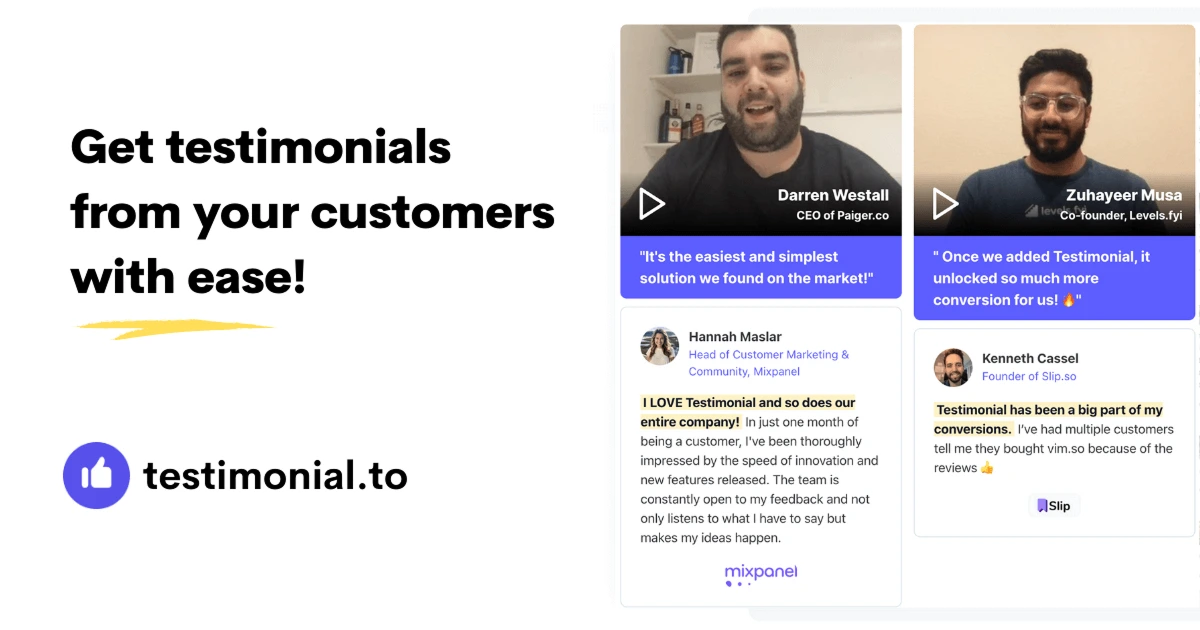
Testimonial is a video and text testimonial collection platform that automates the whole process. You create a branded page, send a link, and customers record testimonials directly in their browser. No logins. No app downloads. No friction.
It handles embedding those testimonials on your website too - just copy and paste a code snippet. No developer required.
Try Testimonial with a 7-day free trial and see how it transforms your social proof.
What is Testimonial?
It's a tool that collects video and text testimonials from your customers and makes them easy to display on your website.
The core workflow is simple. You create a customized collection page where customers answer your specific questions on camera or via text. They submit. You review. You approve. Then you embed the approved testimonials anywhere on your site using pre-built widgets.
What separates it from just filming testimonials yourself is the automation layer. The tool includes T.E.A. (Testimonial Email Automation) which sends automated follow-up invitations to customers. On the Premium plan, that's 500 automated invites monthly. On Ultimate, it's 1,000.
The platform also imports testimonials from X, LinkedIn, and 10+ other social media platforms. So if someone praised your product on Twitter, you can pull that in and display it alongside your video testimonials without rebuilding everything from scratch.
Who is Testimonial For?
Freelancers and solopreneurs who need social proof but don't have time to chase clients for testimonials. If you've ever sent 5 follow-up emails begging for a review, this saves that headache.
SaaS companies collecting customer stories at scale. One company using Testimonial generated 87 video testimonials in 3 months - something that would've required a full-time employee to coordinate manually.
Agencies managing testimonials for multiple clients. The Premium and Ultimate plans support multiple spaces, so you can keep Client A's testimonials separate from Client B's without juggling accounts.
Marketing teams running case study programs. The AI case study generator (Starter Plus and above) turns testimonials into formatted case studies automatically. Not perfect, but it gives you a first draft in 2 minutes instead of 2 hours.
This isn't for businesses that get one testimonial per year. The pricing only makes sense if you're actively collecting and displaying social proof as part of your conversion strategy.
Testimonial Pros and Cons
The platform clearly prioritizes ease of collection over customization depth. If your bottleneck is getting testimonials at all, it's worth it. If you already have testimonials and just need better display options, the limitations might frustrate you.
Testimonial Features: Video Collection, Wall of Love & AI Case Studies
Video and Text Testimonial Collection
Customers land on your branded page and record testimonials using their device's camera and microphone. No app required.
You control the questions. Ask 3-5 specific prompts and customers answer them in order. Video time limits depend on your plan - 3 minutes on Premium, 5 minutes on Ultimate. Free and Starter Plus don't specify video limits in the pricing, which probably means they're shorter or more restricted.
Text testimonials work the same way but customers type instead of recording. Useful for people who hate being on camera.
Wall of Love Widget
This is the main display option for embedding testimonials on your website. It shows testimonials in a grid or carousel format that you can customize with your brand colors.
The free plan includes the widget but with Testimonial's logo. Starter Plus and above remove the branding. The widget is responsive, so it works on mobile without breaking.
Custom cards on the Wall of Love (Premium and above) let you add non-testimonial content to the grid. Useful if you want to mix testimonials with awards or certifications.
Social Media and Review Site Importing
Instead of manually copying testimonials from X, LinkedIn, or review sites, Testimonial imports them directly. The Starter plan covers X and LinkedIn. Starter Plus adds 10+ other platforms (not specified which ones).
This matters because customers often share praise publicly without ever filling out your testimonial form. Importing lets you capture that content without asking twice.
AI Case Study Generator
Available on Starter Plus and above. You feed it testimonials and it generates a formatted case study with sections like "The Challenge," "The Solution," and "The Results."
Quality varies. It works best when testimonials include specific metrics or before-and-after details. If the testimonial is vague ("Great product!"), the case study will be vague too.
T.E.A. (Testimonial Email Automation)
This feature sends automated invitation emails to customers asking for testimonials. Premium includes 500 invitations monthly. Ultimate includes 1,000.
You can schedule follow-ups if someone doesn't respond to the first email. Conversion rates depend on your customer relationships, but automated reminders definitely perform better than sending one email and hoping.
Custom Domain and SSL
Starter Plus and above let you use your own domain for the testimonial collection page. So instead of "testimonial.to/yourcompany," it's "testimonials.yourcompany.com."
SSL is included, which matters for trust. Customers are more likely to record a video on a page that feels like it's part of your site.
See how Testimonial simplifies video testimonials - start your 7-day free trial now.
Testimonial vs Alternatives: Pricing & Feature Comparison
Testimonial wins on automation. The T.E.A. system sends more invitations than competitors, and the social media import feature is unique. If your problem is getting enough testimonials, Testimonial solves it better than the alternatives.
Boast wins on video quality. Their platform includes basic editing tools and filters that make customer videos look more professional. Testimonial doesn't offer any editing, so what you get is what you display.
VideoAsk wins on interactivity. It's designed for two-way video conversations, not just testimonial collection. If you want to ask follow-up questions based on responses, VideoAsk handles that better.
Vocal Video wins on collaboration. It includes team review workflows and approval processes that make sense for larger organizations. Testimonial's collaboration features (space-level seats on Ultimate) are more basic.
Choose Testimonial if your bottleneck is volume. Choose Boast if your bottleneck is video polish. Choose VideoAsk if you need interactive forms beyond testimonials. Choose Vocal Video if you have a team that needs to review and approve together.
For more tools that actually deliver on their promises, check out our leaderboard of top-rated AI tools.
Testimonial Pricing: Plans & Cost Breakdown
All paid plans include a 7-day free trial. No credit card shenanigans - cancel anytime.
The Starter plan is borderline useless. Two video testimonials total means you'll outgrow it the first week. It's really just a way to test the interface before committing.
Starter Plus at $25/month makes sense for solo businesses collecting primarily text testimonials. You still only get 2 video testimonials total, which is the weird limitation here. If you need more video, you're forced into Premium.
Premium at $40/month per space is where most businesses will land. Unlimited testimonials, 500 automated invites, and integrations with Zapier and Make unlock the real value. The per-space pricing gets expensive if you're managing multiple clients - 3 spaces costs $120/month.
Ultimate at $60/month per space adds mostly enterprise features. Sentiment analysis and video metrics are nice, but the real draw is 1,000 automated invites monthly and HubSpot integration. Only worth it if you're actively running large-scale testimonial campaigns.
Compared to competitors, Testimonial sits in the middle on price. Boast starts at $30/month. VideoAsk starts at $30/month. Vocal Video starts at $30/month. Testimonial's free tier is more limited than most, but the Premium plan includes more automation features than competitors at the same price point.
The yearly discount (2 months free) is standard. If you're committed, take it. If you're testing, the 7-day trial on monthly plans is generous enough to figure out if this fits your workflow.
Is Testimonial Worth It? Honest Review
I've been using Testimonial for about 6 months now, and it's become one of those tools I don't think about much because it just works. The main reason I chose it was the automated email invitations - I was spending way too much time manually following up with customers asking for testimonials and getting maybe a 10% response rate.
With T.E.A. set up, I'm seeing closer to 30% conversion on testimonial requests. That's not magic, but it's enough that I actually have a decent collection of video testimonials now instead of just three awkward ones from early customers.
What I really appreciate is how low-friction it is for customers. They click a link, answer a few questions on camera, and they're done in 3 minutes. No account creation, no app downloads. I tested this with a few clients before rolling it out widely, and none of them complained about the process, which is rare.
The AI case study generator is hit or miss. When I feed it detailed testimonials with specific results, it produces a solid first draft. When the testimonial is generic, the case study comes out generic too. I use it to save time on formatting more than actual writing.
My biggest frustration is the lack of video editing. I've had customers submit great testimonials where they ramble for 30 seconds before getting to the point. I can't trim that - I either use the whole thing or reject it. That feels like a basic feature that should exist.
The Wall of Love widget looks professional on my website, but customization options are limited. I wanted to adjust spacing and it just wasn't possible without custom CSS. For most businesses, the default design is fine. For perfectionists, it's slightly annoying.
Overall, Testimonial solved my specific problem, which was getting more testimonials without spending hours chasing them. If that's your bottleneck too, it's worth the $40/month. If you already have plenty of testimonials and just want better display options, you might find it limiting.
Testimonial Review: Final Thoughts
Testimonial does one thing exceptionally well - it removes friction from collecting testimonials. The automated email system, browser-based recording, and social media importing combine to solve the actual problem most businesses have, which is getting customers to submit testimonials in the first place.
The pricing structure makes sense for small businesses up through mid-sized companies. Agencies managing multiple clients will find the per-space pricing adds up quickly. The free tier is too limited to be useful beyond testing, but the 7-day trial on paid plans gives you enough time to collect real testimonials and see if it fits.
Use Testimonial if you're actively collecting testimonials and need automation to scale. The T.E.A. system and social media importing justify the cost.
Skip it if you only collect a handful of testimonials per year or you already have a testimonial collection process that works. The limitations on video editing and widget customization might frustrate you.
Best alternative? Boast if video quality matters more than volume. VideoAsk if you need interactive video forms beyond testimonials.
Start collecting authentic video testimonials today with Testimonial's 7-day free trial.
FAQ
What is a testimonial review?
A testimonial review is a customer's statement about their experience with a product or service, usually including what problem it solved and what results they got. It's more detailed than a star rating and focuses on specific benefits.
Is a testimonial the same as a review?
Not quite. Testimonials are typically positive statements used for marketing, often collected directly by the company. Reviews can be positive or negative and usually appear on third-party sites like Google or Trustpilot where companies have less control.
How effective are testimonials?
Video testimonials increase conversion rates by an average of 25-35% when displayed on landing pages, according to multiple SaaS conversion studies. Text testimonials perform at about 15-20% improvement. Effectiveness depends heavily on placement and relevance to the buyer's decision stage.
Do people use fake testimonials?
Yes, and customers can tell. Fake testimonials usually lack specific details, use generic praise, and don't include verifiable information like a person's name, photo, or company. Video testimonials are harder to fake, which is why they tend to perform better for trust-building.
What is the purpose of a testimonial?
Testimonials provide social proof that reduces buying risk. They show potential customers that real people have used the product and got results. Most effective when the testimonial customer matches the target audience's profile and problem.


